

Download all your data
Your data is yours. Under Settings → Business, at the bottom under Your data, you can download everything in the account as one zip file, which you can open without heyArtist and move to another system.
The screenshots show heyArtist in Danish; the labels are named in English here as they appear when you switch the app to English.
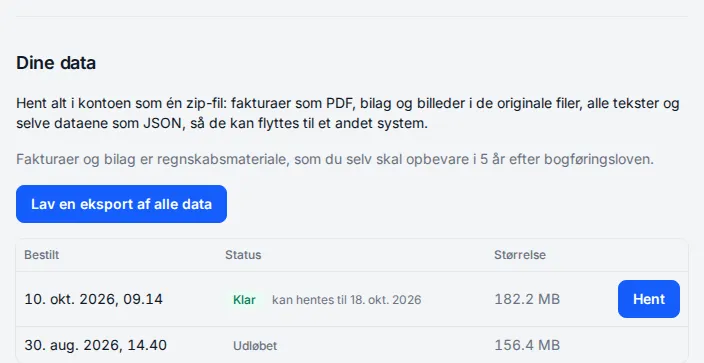
Make an export
Section titled “Make an export”- Click Export all data.
- heyArtist packs the export in the background. It can take a while if the account has many pictures. You can close the page.
- You get an email when it is ready.
- Come back to Your data and click Download.
Only one export can be in progress at a time.
Status
Section titled “Status”| Status | Means |
|---|---|
| Queued | The export is waiting to be packed. |
| Packing … | The export is being made now. |
| Ready | Can be downloaded. It says until when — an export can be downloaded for 7 days. |
| Failed | Something went wrong. Try again, or write to support. |
| Expired | Can no longer be downloaded. Make a new one. |
What is in the zip file
Section titled “What is in the zip file”- README.txt — what is where.
- Invoices as the PDFs your customers received.
- Overviews of invoices and expenses as spreadsheets (CSV) for your bookkeeper.
- Every uploaded file — pictures, video, PDFs and receipts — in the original files.
- Files from your support cases.
- The data itself as JSON: projects, journal, works, contacts, expenses, contracts, trips and the rest.