

Signing on paper
You do not have to sign digitally. Many contracts are still signed on paper — when you meet for the hanging, for example. You then keep the signed copy on the contract, so it is stored with everything else.
Signing on paper does not count towards the month’s digital signatures.
The screenshots show heyArtist in Danish; the labels are named in English here as they appear when you switch the app to English.
How to do it
Section titled “How to do it”- Finalise the contract. See Fill in and finalise.
- Click Open PDF and print the contract.
- Sign it — both parties.
- Scan or photograph the signed contract and save it as one PDF file. Most scanner apps on a phone can save as PDF.
- Open the contract in heyArtist and click Upload signed copy next to the version.

- Choose the PDF file.
The file must be a PDF of at most 25 MB. If it is not a PDF, it says The file is not a PDF.
Once the copy is uploaded
Section titled “Once the copy is uploaded”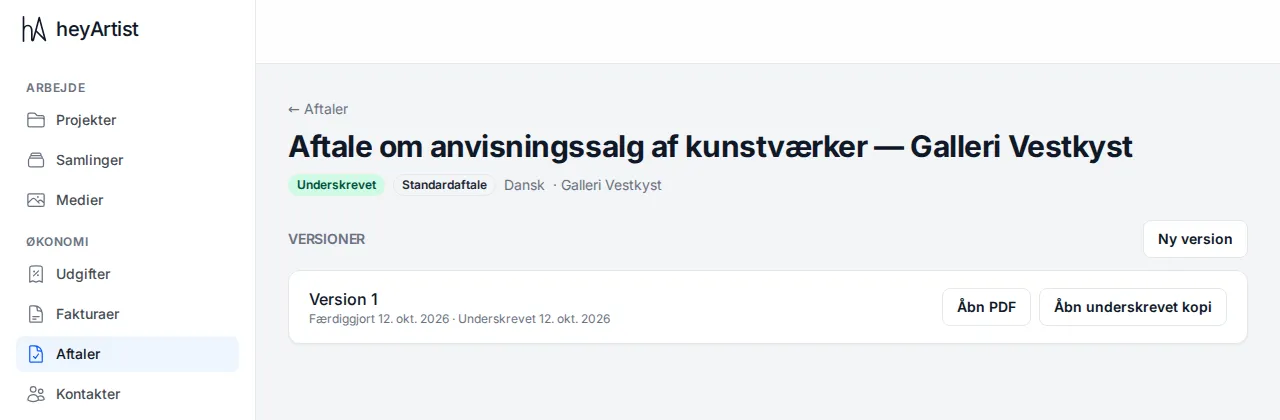
- The contract gets the status Signed.
- Under Versions the date of signing is shown, and Open signed copy opens the PDF you uploaded.
- The other party, and any “Att.” person, become Collaborator on the contact. See Contacts.
The signed copy cannot be replaced afterwards. If the contract needs changing, make a new version — the signed version stays as it is.