

Make an artwork list
An artwork list (in Danish værkliste) lists the works hanging in an exhibition — with title, year, technique, dimensions and price. The gallery uses it as a price list; you use it for insurance or shipping.
The screenshots show heyArtist in Danish; the buttons are named in English here as they appear when you switch the app to English.
Make the list
Section titled “Make the list”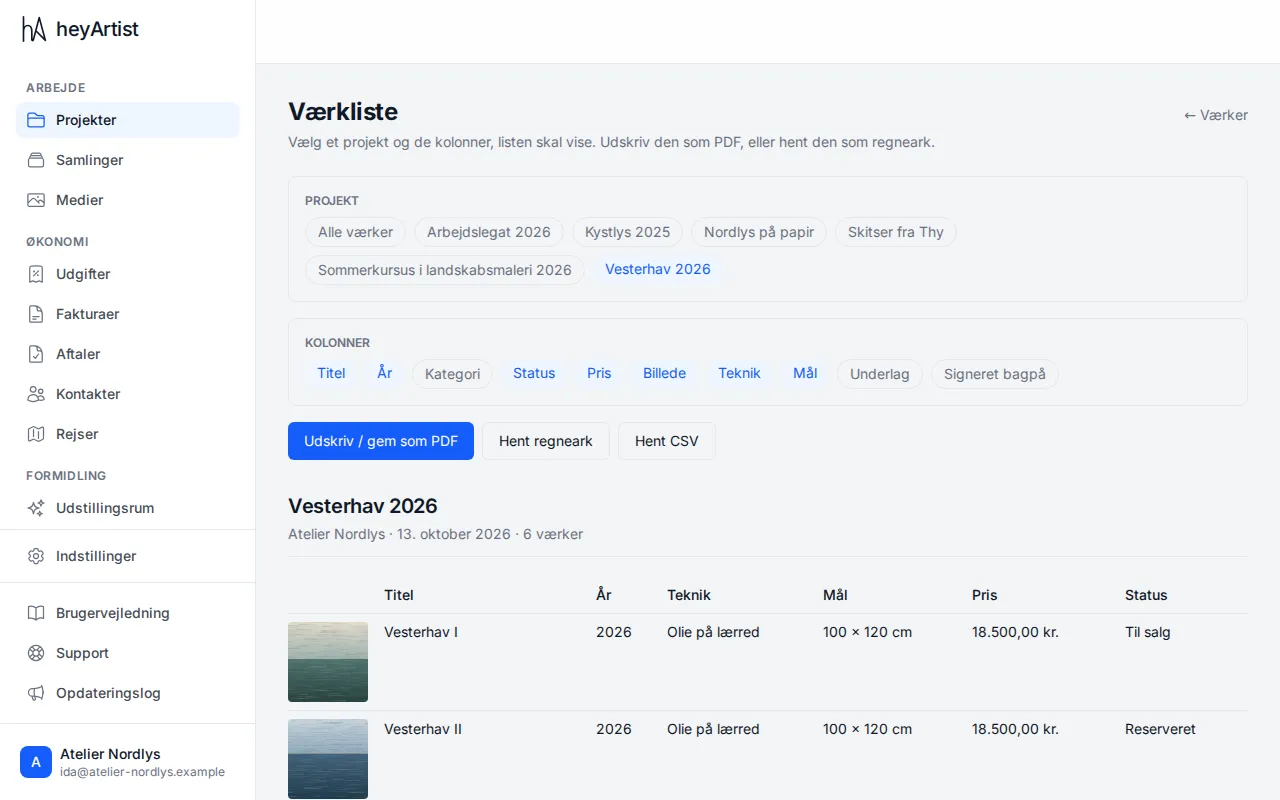
- Click Collections in the menu, then Artwork list.
- Under Project, choose the project. All artworks includes every work in the account.
- Under Columns, click the columns the list should have. The chosen ones are blue. Besides Title, Year, Category, Status, Price and Image you can choose your own fields, such as Technique and Dimensions.
The list below the buttons shows at once what it looks like — with the project’s name, the account, the date and the number of works.
Technique, materials and dimensions come from your own fields on the artwork types. If you have none, make them under Settings → Categories. See Artwork types and custom fields.
Save or share the list
Section titled “Save or share the list”- Print / save as PDF opens the browser’s print dialog. Choose a printer, or choose Save as PDF.
- Download spreadsheet downloads the list as an Excel file (.xlsx).
- Download CSV downloads the list as a CSV file, which most programs can read.