

Receipts by email
Many receipts arrive by email: a web shop, a ferry ticket, an invoice from the framer. You don’t need to save and upload them. Forward the mail to heyArtist, and the receipt becomes an expense waiting for you to approve it.
The screenshots show heyArtist in Danish; the labels are named in English here as they appear when you switch the app to English.
The account’s address
Section titled “The account’s address”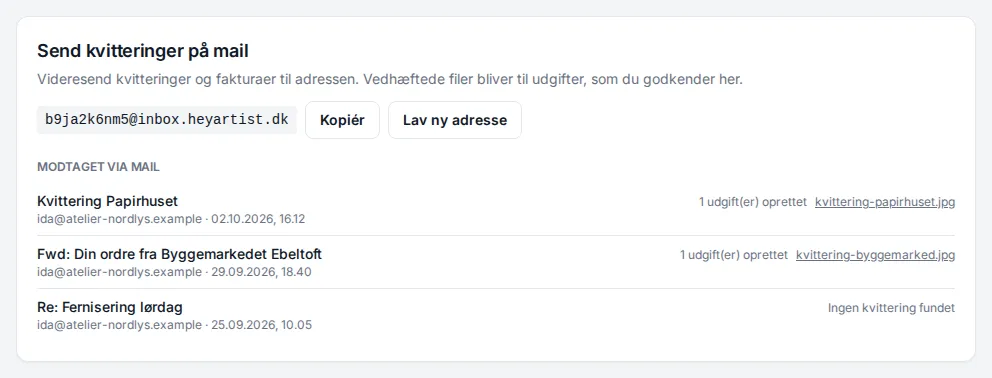
Under Email your receipts on the Expenses page is the account’s own address. It ends in @inbox.heyartist.dk.
- Click Copy to copy the address.
- Save it as a contact in your mail program, such as “heyArtist receipts”.
- Forward receipts to it — or give it as the recipient when a shop asks where to send the receipt.
Each receipt becomes an expense marked Needs review. heyArtist reads the amount, date and vendor, just as when you upload. See Reviewing and approving an expense.
What becomes an expense?
Section titled “What becomes an expense?”- Attachments — PDF, JPG, PNG, WebP and HEIC (iPhone photos). Each file becomes its own expense. Up to 10 files per mail and 20 MB per file.
- The mail itself — if the mail has no receipt attached, such as an order confirmation from a web shop, the mail is saved as a PDF and becomes one expense.
- Calendar invitations, vCards and digital signatures that come with the mail are skipped.
If the mail has an attachment that cannot be used — too large, or another file type — the mail is not saved as a PDF. The log then says No receipt found, and you will need to send the receipt again in a format that works.
A project’s address
Section titled “A project’s address”
Every project has its own address. It is at the bottom of the project’s page under Email your receipts. A receipt you send there arrives as an expense on the project — so it counts towards the project’s budget without you choosing the project afterwards.
The project’s address is made of the account’s address plus a part that is the project’s own.
The log: Received by email
Section titled “The log: Received by email”Below the address, Received by email lists the mails that have come in, with subject, sender and time — and what became of them:
| The log says | Means |
|---|---|
| 1 expense(s) created | The receipt has become an expense. Click the file name to open it. |
| Duplicate – already filed | The same receipt has been booked before, so it was not created again. See When a receipt is refused. |
| 1 file(s) skipped | An attachment could not be used. |
| No receipt found | The mail held no receipt heyArtist could use. |
| Processing … | The mail is being read. |
| Failed – will retry | Something went wrong. heyArtist tries again by itself. |
| Failed – please send the receipt again | It did not work after several attempts. Send the mail again. |
| Rejected: too many mails today | An account takes at most 100 mails a day. Send the rest tomorrow. |
Who may send?
Section titled “Who may send?”Anyone can send to the address — a shop directly, too. But a receipt from a sender who is not a member of the account gets a warning on the expense: The sender is not a member of this account. Check that the receipt is yours. If the mail comes from you, it says Received by email from with your address.
Making a new address
Section titled “Making a new address”If the address has fallen into the wrong hands and unwanted mail arrives, you can make a new one.
- Click New address next to the address.
- Confirm.